Examples
To simplify and streamline the modeling tasks, OneModel allows us to create incremental implementations of a model by using smaller models previously defined. In the following sections, we present two case scenarios to show how to work with OneModel and how these ideas can be carried out with its syntax in an easy way. These case scenarios demonstrate how to use OneModel software.
We used the following software tools to perform the examples: Matlab R2020b, Python v3.8.0, and OneModel v0.0.10. We recommend using the same software versions to replicate the examples.
Constitutive protein expression
In this section, we show an example of how to model constitutive protein expression using OneModel syntax. The code examples are easy-to-follow, and they are well commented: there is no need to know OneModel syntax to follow them. Moreover, it shows the benefits of using OneModel syntax for modeling synthetic biology circuits.
Protein expression—in this chapter, we use protein expression and gene expression interchangeably, as we will implement models of gene expression leading to the synthesis of proteins—is a complex process that involves many reactions and interactions. For this example, we simplify this process, and we take into account mRNA transcription, protein translation, and degradation of mRNA and protein:
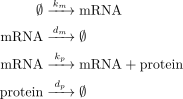
Fig. 8 Reactions of constitutive protein expression
where mRNA and protein are the mRNA and protein concentration (we could alternatively work with the number of molecules of each species instead of working with concentrations); k_m and k_p are the rate constants related to transcription and translation, respectively; and d_m and d_p are the degradation rate constants of the mRNA and the protein.
In the set of reactions of Fig. 8, there are three different classes of model-elements: species (mRNA and protein), parameters (k_m, k_p, d_m and d_p) and the reactions.
These are the elements that we have to implement using the OneModel syntax.
Listing 9 implements the model-elements in Fig. 8 using OneModel syntax.
Lines 3–6 define mRNA and protein as species and set their initial values to zero.
Lines 8–13 define the parameters and set their values to one (for example purposes).
Moreover, lines 15–20 define the reactions, with their explicit reaction rates placed after the ; symbol.
Note that texts after a # symbol are comments which are only used to explain the function of the code.
### Simple gene expression model. ###

species       # Start declaring species.
  mRNA=0      # mRNA concentration.
  protein=0   # Protein concentration.
end           # End declaring species.

parameter     # Start declaring parameters.
  k_m=1       # mRNA transcription rate.
  d_m=1       # mRNA degradation rate.
  k_p=1       # Protein translation rate.
  d_p=1       # Protein degradation rate.
end           # End delaring parameters.

reaction                                # Start declaring reactions.
  0 -> mRNA              ; k_m          # mRNA transcription.
  mRNA -> 0              ; d_m*mRNA     # mRNA degradation.
  mRNA -> mRNA + protein ; k_p*mRNA     # Protein translation.
  protein -> 0           ; d_p*protein  # Protein degradation.
end                                     # Stop declaring reactions.
Fig. 9 shows a simulation of this code. Once we have the OneModel implementation, we can use SBML2dae to generate a Matlab implementation of the OneModel code to simulate it. This way, if the simulation result is coherent, we can validate the OneModel code and continue with this example.
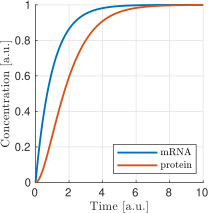
Fig. 9 In blue is shown mRNA concentration and in red protein concentration. All units are arbitrary.
A synthetic circuit rarely consists of the expression of just one protein. Typically they are composed of several proteins (two, or three, even hundreds of them). As a result, the mathematical models tend to get very repetitive because it is necessary to replicate the set of reactions for each of the proteins.
One of the most common approaches to this problem is to implement each protein’s reactions and equations by hand: copy-pasting the code and thus making a monolithic model. Copy-pasting is a bad programming practice, and it should be avoided. Models of this type are hard to maintain and to use. Indeed, this bad programming practice is due to using software that does not allow incremental and/or modular modeling.
Listing 10 is an example of this bad programming practice. What we have done in this example is to copy-paste the Listing 9 twice. We have changed the name of species and parameters to create one set of species and parameters for the constitutive expression of protein A and another set for protein B. This code is hard to read, and this situation will worsen with each extra protein we want to add to the model: we developed OneModel to avoid this type of situations.
### How NOT to model the expression of two genes. ###

species
  mRNA_A=0, protein_A=0   # Gene A mRNA and protein concentration.
  mRNA_B=0, protein_B=0   # Gene A mRNA and protein concentration.
end

parameter
  k_m_A=1,  d_m_A=1   # Transcription and degradation rates of mRNA A.
  k_p_A=1,  d_p_A=1   # Translation and degradation rates of protein A.
  k_m_B=1,  d_m_B=1   # Transcription and degradation rates of mRNA B.
  k_p_B=1,  d_p_B=1   # Translation and degradation rates of protein B.
end

reaction
  0 -> mRNA_A                  ; k_m_A           # Transcription mRNA A.
  mRNA_A -> 0                  ; d_m_A*mRNA_A    # Degradation mRNA A.
  mRNA_A -> mRNA_A + protein_A ; k_p_A*mRNA_A    # Translation protein A.
  protein_A -> 0               ; d_p_A*protein_A # Degradation protein A.
  0 -> mRNA_B                  ; k_m_B           # Transcription mRNA B.
  mRNA_B -> 0                  ; d_m_B*mRNA_B    # Degradation mRNA B.
  mRNA_B -> mRNA_B + protein_B ; k_p_B*mRNA_B    # Translation protein B.
  protein_B -> 0               ; d_p_B*protein_B # Degradation protein B.
end
The efficient solution to this problem is to use modularity.
OneModel syntax allows us to wrap Listing 9 as a model.
We group all the species, parameters, and reactions as a module which we can reuse by instantiating it as objects instead of copy-pasting the code for each protein.
This way, we avoid copy-pasting the code for each protein.
Instead, we can create multiple instances of this model.
Listing 11 shows how to implement Listing 9 as a model.
This process is easy to do; we need to wrap the previous code inside the model and end keywords (lines 4–19).
This way, ProteinConstitutive is a constructor which will generate instances of the model for us.
In the standalone block, we show an example of using ProteinConstitutive.
We have just created object A which is an instance of model ProteinConstitutive.
Object A has a copy of all the model-elements of ProteinConstitutive, and they are accessible by the use of the . operator. For example, the mRNA concentration of object A can be accessed as A.mRNA.
### Definition of ProteinConstitutive. ###

## ProteinConstitutive models constitutive gene expression. ##
model ProteinConstitutive  # Start declaring model.

  species mRNA=0, protein=0  # mRNA and protein concentration.

  parameter
    k_m=1, d_m=1  # mRNA transcription and degradation rate.
    k_p=1, d_p=1  # Protein translation and degradation rate.
  end

  reaction
    0 -> mRNA              ; k_m          # mRNA transcription.
    mRNA -> 0              ; d_m*mRNA     # mRNA degradation.
    mRNA -> mRNA + protein ; k_p*mRNA     # Protein translation.
    protein -> 0           ; d_p*protein  # Protein degradation.
  end
end  # End declaring model.

## Example of how to use ProteinConstitutive. ##
standalone
  A = ProteinConstitutive()
end
Listing 12 shows how easy it is to model the expression of two proteins taking advantage of the previously defined model. First, we must import the previous code into the new model (line 5). And then, we just need to create as many proteins as we need by writing lines 8–9. Declaring models and instantiating objects is an efficient way to model the expression of two proteins.
### How to model the expression of two proteins. ###

# Import ProteinConstitutive model.
# (note that the standalone code is not imported).
import './ex03_protein_constitutive.one'

# Initialize A and B as instances of ProteinConstitutive.
A = ProteinConstitutive()
B = ProteinConstitutive()

# We could easily add more proteins by writing:
# C = ProteinConstitutive()
# ...
Induced protein expression
ProteinConstitutive models genes that are constitutive expressed.
In many synthetic circuits, the presence of a transcription factor (which could also be a protein) can induce gene expression.
This section, we show how to create another model for induced protein expression.
As a first approach, we could create a new model by copy-pasting the code of ProteinConstitutive and modifying it to make the expression inducible: this would be another type of bad programming practice.
Doing that is equivalent to what we did in Listing 10, and it would lead to an inefficient workflow because each time we want to define a new model we will have to duplicate the transcription and translation reactions.
Whenever you are tempted to copy-pasting any part of your code: stop doing it; it is an indicator that there is a better way to do it. Take the time to see if someone else has stumbled upon your problem—it’s a golden opportunity to improve your programming skills—.
In the previous case, the solution was to implement a model instead of copy-pasting the code.
Here the solution is to create a new model by extending the functionality of ProteinConstitutive.
ProteinConstitutive model.### Definition of ProteinInduced. ###
import 'ex03_protein_constitutive.one'
## ProteinInduced extends the ProteinConstitutive model to make ##
## the expression inducible by a transcription factor. ##
model ProteinInduced(ProteinConstitutive)
input TF # Define the transcription factor as an input.
species k_m=0 # Override the parameter k_m to be a species.
parameter
h = 1 # Half-activation threshold.
k_m_max = 1 # Maximum transcription rate.
end
# Set the value of k_m as an substitution equation.
rule k_m := k_m_max * TF/(TF+h)
end
## Example of how to use ProteinInduced. ##
standalone
A = ProteinConstitutive()
B = ProteinInduced()
rule B.TF := A.protein # Set protein A as the transcription factor of B.
end
Listing 13 shows the definition of a new model ProteinInduced by extending ProteinConstitutive.
First, we have to import the code of ProteinConstitutive (line 3).
We declare ProteinInduced model and we set ProteinConstitutive as its parent (note that the name of ProteinConstitutive is in the parentheses in line 7).
This way, ProteinInduced will have all the model-elements defined in its parent.
The rest of the work is to add the inducible part to the model.
For this, we do not need to change the reactions; we just need the value of parameter k_m to change depending on the transcription factor concentration.
To this end, we declare the transcription factor TF as an input (line 9).
We override the parameter k_m to be a species in line 10 (note that the declaration of species refers both to chemical species or to state variables).
The last step is to declare the parameters for a Hill-like function (lines 13–14) and assign the value of k_m as the Hill function using the substitution rule.
The standalone example (lines 22–26) models a constitutively expressed protein A and a protein B which is induced by A.
Fig. 10 shows a simulation of ProteinInduced.
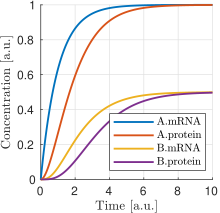
Fig. 10 Simulation of ex05_protein_induced.one. Protein A is expressed constitutively, and protein B expression is induced by protein A. The mRNA and protein concentration of gene A are shown in blue and red, and the ones of gene B are shown in yellow and purple. All units are arbitrary.
Antithetic controller
To exemplify more complex gene circuits, in this section, we model an antithetic controller making use of the models for constitutive and induced protein expression defined in the previous sections.
The antithetic controller is a synthetic gene system to robustly control the expression of a protein of interest.
This circuit is implemented using three genes coding three proteins: sigma z_1, anti-sigma z_2, and the protein of interest x.
Normally, z_1 is constitutively expressed and induces the production of x. In turn, x activates the expression of z_2.
Finally, z_1 and z_2 annihilate each other in a sequestration reaction, thus closing the loop.
The following set of reactions shows all the biochemical reactions in this gene circuit. The reactions related to protein expression and degradation:
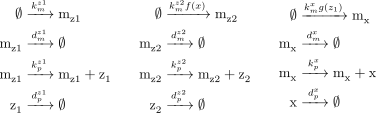
Fig. 11 Transcription, translation and degradation reactions
and the sequestration reaction:

Fig. 12 Sequestration reaction
where m_{i} are the mRNA concentration of z_1, z_2 and x; k_m^i and k_p^i are the rate constant parameters related to transcription and translation, respectively; d_m^i and d_p^i are the degradation rate constants of mRNA and protein; f(x) and g(z_1) are activation Hill-like functions; and \gamma is the antithetical sequestration rate constant.
Note that in Fig. 11 there are a lot of repetitive reactions to model the expression of z_1, z_2, and x.
We can take advantage of this repetitive structure and use the model for protein expression that we defined before.
Listing 14 is an implementation of the AntitheticController model using the models ProteinConstitutive and ProteinInduced.
First, we have to import the previous models into this new one (line 3).
Note that 'ex05_protein_induced.one' already imports ProteinConstitutive.
We define the three proteins which make the circuit. We use ProteinConstitutive for protein z1 and ProteinInduced for proteins z2 and x (lines 6–8).
We define the annihilation rate constant gamma (line 9), and we add the annihilation reaction to the model (line 14).
Note that if we define models using reactions (instead of rules), we can add more reactions to previously defined models, and OneModel will update all the rates of changes of the species automatically—this makes it very easy to expand the functionality of models as we have done with adding the antithetic reaction in Code Listing 14.
### Definition of AntitheticController. ###

import 'ex05_protein_induced.one'  # ProteinConstitutive and ProteinInduced.

model AntitheticController
  z1 = ProteinConstitutive()  # Sigma factor.
  z2 = ProteinInduced()       # Anti-sigma factor.
  x  = ProteinInduced()       # Protein of interest to control.
  parameter gamma = 1         # Antithetic sequestration rate.

  reaction
    # We have to add the antithetic reaction.
    # Note that we can access species inside objects using '.' operator.
    z1.protein + z2.protein -> 0 ; gamma*z1.protein*z2.protein
  end

  rule
    x.TF  := z1.protein  # Set z1 as the transcription factor of x.
    z2.TF := x.protein   # Set x as the transcription factor of z2.
  end
end

standalone  # Example of how to use the AntitheticController.
  circuit = AntitheticController()
end
Then, we set z1 as the transcription factor of protein x. In turn, x will be the transcription factor of protein z2 (lines 18–19).
Finally, we set the standalone example as just the AntitheticController.
Fig. 13 shows a simulation of the AntitheticController model.
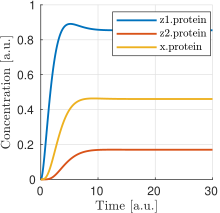
Fig. 13 Simulation of ex06_antithetic_controller.one. The concentration of sigma protein z_1 is shown in blue, in red the anti-sigma concentration z2 and in yellow the protein of interest x. All units are arbitrary.
Host-aware antithetic controller
This last example shows the use of OneModel with complex and large models. The first approach to model a synthetic gene circuit is usually done by neglecting the interactions between the host cell and the gene circuit. However, there is an increasing need to include host dynamics to improve model prediction capabilities. These host-aware dynamic models are complex and not easy to implement since they may contain several states and equations.
Code Listing 15 depicts the WildType model that represents the host-aware model freely distributed with OneModel.
Lines 8–17 show an incomplete representation of it just for demonstration purposes.
This model implements the equations of the host-aware model and takes into account the host dynamics, the competition for cell resources in protein expression, and its effect on cell growth.
The model WildType is rather complex.
However, from a user perspective, we only need to know how to modify its input WSum (line 10), which is a value that keeps track of the burden introduced by the expression of exogenous proteins like the ones introduced by the antithetic controller.
WildType_ProteinConstitutive is a model provided also by WildType, which defines the base protein expression mechanism.
The user may use this model as a building block for its own circuits (similarly to section Constitutive protein expression).
There were no inputs in the original ProteinConstitutive model. However WildType_ProteinConstitutive is a more complex model which has inputs to calculate protein expression as function of the effective translation rate of ribosomes nu_t, and the cell growth rate mu.
WildType is the host-aware model freely distributed with OneModel, WildType_ProteinConstitutive is the constitutive protein expression mechanism, and WildType_ProteinInduced is the inucible protein experssion mechanism. The figure shows an incomplete representation of these models only for the example purposes.### Definition of WildType. ###
# We show here an incomplete implementation of WildType and
# WildType_ProteinConstitutive and WildType_ProteinInduced
# (the 'dot-dot-dot' indicates that the original original code continues).
## Host aware model of a E.coli. cell##
model WildType
input WSum_exo # Burden generated by exogenous genes.
# The model takes into account many relevant variables as:
# the effective ribosome elongation rate, the growth rate, etc.
species nu_t, mu, ...
...
end
## Model for consitutive protein expression. ##
model WildType_ProteinConstitutive
input nu_t, mu, ... # The inputs of this model are species of WildType.
species W # Burden generated by the expression of this protein.
...
end
## Model for induced protein expression. ##
model WildType_ProteinInduced (WildType_ProteinConstitutive)
input TF # Transcription factor which induced expression.
...
end
Listing 16 shows the WildType_AntitheticController model that is the implementation of the antithetic controller taking into account the host dynamics.
First, in line 2 we import the WildType, the WildType_ProteinConstitutive and the WildType_ProteinInduced models.
Then in line 4, we declare a new model WildType_AntitheticController as an extension of WildType model; this way, we have all the dynamics of the host, and we only need to add the remaining dynamics of the antithetic controller.
In lines 5–8, we define the proteins of the antithetic controller, sigma z1 as a constitutive expressed protein and anti-sigma and the protein of interest (z2 and x) as induced expressed proteins.
The WildType model needs to know if any of the proteins are under active degradation to ensure that the cell mass is calculated correctly. Therefore we cannot implement the antithetic reaction as we did in Listing 14.
However, there is a simple workaround; we can define the complex sigma and anti-sigma z12 (line 7) that is not expressed directly by the cell (line 10) but is generated as a result of the sequestration reaction of the antithetic controller (line 17).
The rest we have to do in the model is to set up the antithetic controller (lines 21–22) and calculate the total burden generated by the exogenous proteins (line 26).
Finally, we have to satisfy the inputs for each protein (lines 30–32); this step is omitted in the example for brevity.
### Host-aware antithetic controller circuit. ###
import 'ex07_wild_type.one'

model WildType_AntitheticController (WildType)
  z1  = WildType_ProteinConstitutive() # Sigma.
  z2  = WildType_ProteinInduced()      # Anti-sigma.
  z12 = WildType_ProteinConstitutive() # Sigma and anti-sigma complex.
  x   = WildType_ProteinInduced()      # Protein of interest.

  parameter z12.omega=0  # z12 is not expressed.
  parameter gamma=10     # Antithetic sequestration rate.

  # We have to add the antithetic reaction, but note that in the
  # wild-type model we cannot degrade proteins directly, instead
  # we have to redirect the mass of z1 and z2 into z12.
  reaction
    z1.protein + z2.protein -> z12.protein ; gamma*z1.protein*z2.protein
  end

  rule
    x.TF  := z1.protein  # Set z1 as the transcription factor of x.
    z2.TF := x.protein   # Set x as the transcription factor of z2.
  end

  # We have to take into account the burden of the exogenous proteins.
  rule cell.WSum_exo := z1.W + z2.W + z12.w + x.W

  # Lastly, we have to satisfy the inputs of z1, z2, z12, and x.
  rule
    z1.nu_t := cell.nu_t
    z1.mu := cell.mu
    ...
  end
end

standalone  # Example of how to use the WildType_AntitheticController.
  ac = WildType_AntitheticController()
end
Fig. 14 shows a set of simulations of the host-aware antithetic controller performed with SBML2dae.
In these simulations, we have considered two simplifications of the model: (i) to neglect the burden produced by the antithetic controller to the host—this is done by removing the z1.W + z2.W + z12.W term from line 26 of Code Listing 16—, and (ii) to neglect the dilution of the sigma and anti-sigma factors of the antithetic controller.
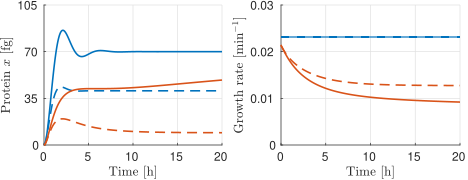
Fig. 14 Set of simulations of the host-aware antithetic controller, each line corresponds to a simulation with different conditions.
The solid lines correspond to simulations that neglect the dilution of the sigma and anti-sigma factors on the antithetic controller, while the dashed lines correspond to simulations that take dilution into account.
The blue lines correspond to simulations that neglect the burden produced by the antithetic controller to the host, and the red lines correspond to simulations in which this burden is taken into account.
The left plot shows the protein of interest x to be controlled by the antithetic controller, the reference of the antithetic controller was set to 70 fg.
The right plot shows the host growth rate.
If we neglect the burden produced by the antithetic controller (blue lines), we can see how the growth rate does not change during simulation time (both solid and dashed blue lines overlap in the plot). However, if we consider that burden (red lines), we see how the growth rates vary accordingly—because now the host is using resources to express the antithetic controller instead of using them to grow.
Suppose we neglect the dilution of the sigma and anti-sigma factors (solid lines). In that case, the antithetic controller will preserve the integral action, which makes x to reach the reference of 70 fg in the solid blue line, however in the solid red line (where the burden is taken into account) the x still gets to the reference (this is not shown in the figure) but it takes much more time—due to effect of the integral action is diminished due to the cell is growing slower—. However, if we consider the dilution (dashed lines), the antithetic controller loses the integral action and never achieves the reference value.
We have done this because it is an excellent example of showing the flexibility of the OneModel workflow; it is straightforward to perform multiple simulations with different conditions taking advantage of the modularity.